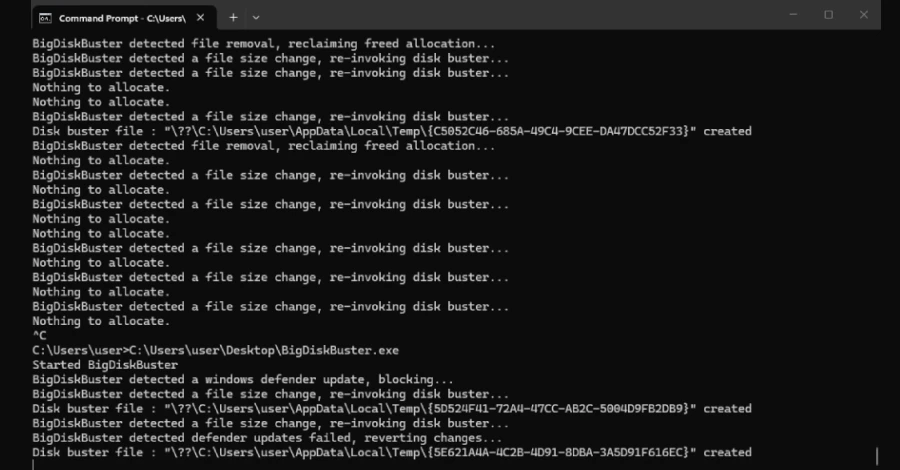
A newly published proof-of-concept exploit named BigDiskBuster demonstrates a potential way to prevent Microsoft Defender from installing platform and security intelligence updates by consuming all available storage on a Windows system.
The tool was published on GitHub on September 19, 2026, by security researcher Abdelhamid Naceri. The vulnerability currently has no CVE identifier, Microsoft security advisory or available patch, and its behavior has not been independently confirmed.
How BigDiskBuster Disrupts Defender Updates
BigDiskBuster is designed to monitor the Windows system drive for activity involving directories used by Microsoft Defender’s update process.
When Defender begins downloading a platform or security intelligence update, the proof-of-concept attempts to create a hidden temporary file that consumes the remaining free disk space.
With insufficient storage available, the Defender update process fails to complete.
After Defender removes its temporary staging directory following the failed update, the tool deletes the large file and waits for another update attempt.
The proof-of-concept also interacts with MRT.exe, Microsoft’s Malicious Software Removal Tool, in a manner intended to prevent Windows Update from replacing the executable.
Defender Continues Running but Protection Data Can Become Outdated
The technique does not appear to disable Microsoft Defender itself. Instead, it interferes with the mechanism used to keep its platform and detection content up to date.
If security intelligence updates repeatedly fail, Defender could eventually operate with outdated detection information, potentially reducing its ability to identify newly emerging threats.
Naceri’s demonstration reportedly showed Windows returning a generic error when Defender attempted to update. However, the available proof-of-concept does not establish whether such failures automatically generate a security alert.
No Patch or CVE Has Been Assigned
BigDiskBuster currently has no publicly assigned CVE number, Microsoft advisory or official remediation.
Naceri said the tool appears to work across supported Windows versions, while also acknowledging that the proof-of-concept remains imperfect and requires additional work.
There has been no independent confirmation of the claimed impact at the time of publication.
Because the technique is publicly available, security teams may nevertheless want to monitor systems for unusual Defender update failures and unexpected disk-space consumption.
Researcher Previously Released Defender Exploits
Naceri has previously published several security tools targeting Microsoft Defender and Windows.
His earlier tools, including BlueHammer, RedSun and UnDefend, were reportedly exploited during real-world attacks before Microsoft issued patches. All three vulnerabilities were subsequently added to the CISA Known Exploited Vulnerabilities (KEV) catalog.
Naceri has continued publishing additional security research involving Microsoft security products on a regular basis.
BigDiskBuster Differs From Earlier UnDefend Flaw
The new proof-of-concept has similarities to UnDefend, another Defender denial-of-service technique disclosed by Naceri earlier in 2026.
Microsoft addressed the UnDefend vulnerability as CVE-2026-45498 in Antimalware Platform version 4.18.26040.7.
However, the two techniques use different mechanisms.
UnDefend relied on uncontrolled resource consumption to interfere with Defender’s update process. BigDiskBuster instead attempts to exhaust available disk space precisely when Defender creates directories for downloading and staging updates.
Because the new proof-of-concept uses a different approach, it remains unclear whether Microsoft’s earlier mitigation also protects against BigDiskBuster.
How Administrators Can Check Defender Status
Although no official fix is currently available for BigDiskBuster, administrators can verify whether Defender’s security intelligence and platform versions are current.
In Windows Security, users can navigate to:
Virus & threat protection → Protection updates → Check for updates
PowerShell can also be used to inspect Defender’s installed versions. The Get-MpComputerStatus command reports relevant information, including the AMEngineVersion and AMProductVersion fields.
Monitoring Can Help Detect the Technique
Security teams can watch for several indicators that could point to an attempted BigDiskBuster-style attack.
These include:
- Repeated Microsoft Defender update failures
- Unexpectedly low free space on the Windows system drive
- Large hidden files appearing in temporary directories
- Unusual activity around Defender update folders
- Unexpected execution of unknown binaries
Organizations can also restrict unauthorized executable files through application-control technologies such as Windows Defender Application Control (WDAC) or AppLocker.
Until Microsoft provides further guidance or a dedicated fix, maintaining adequate disk-space monitoring and restricting execution of untrusted programs can help reduce exposure to this type of disruption.