A Russia-linked cyber threat group has been using fake CAPTCHA verification pages to trick Ukrainian users into installing malware, according to a security alert from the Computer Emergency Response Team of Ukraine (CERT-UA).
The campaign has been attributed to UAC-0145, a threat cluster associated with the broader Sandworm hacking group, which has been linked to Russia’s military intelligence agency, the GRU.
Instead of relying on traditional malware delivery methods, the attackers are using the increasingly popular ClickFix social engineering technique, where victims are manipulated into running malicious commands on their own devices.
Fake CAPTCHA Pages Used to Trigger Malware Installation
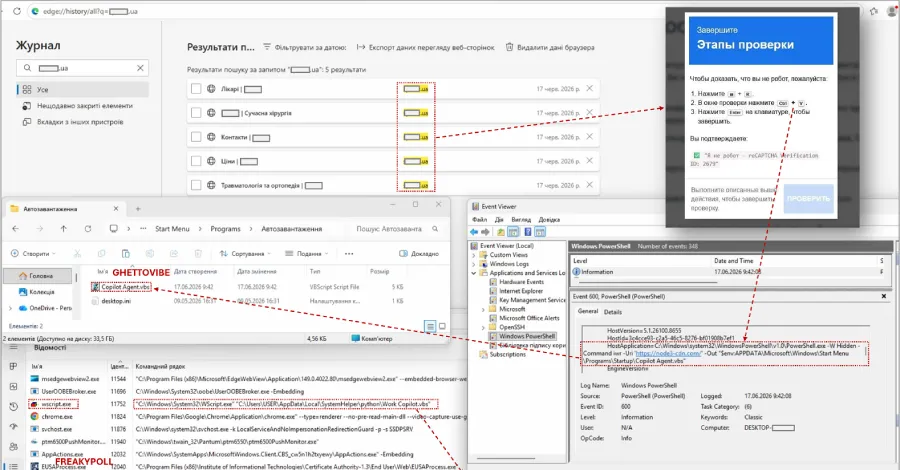
In the attacks, compromised websites display fake CAPTCHA verification screens that instruct visitors to copy and execute PowerShell commands through the Windows terminal.
CERT-UA said these commands can be designed to download malicious scripts and place them in Windows startup directories to maintain persistence after system reboots.
One identified malware variant, named GHETTOVIBE, was found using this approach to establish a foothold on infected machines.
The attackers also deployed SCOUTCURL, a PowerShell-based reconnaissance tool designed to collect information about compromised systems.
Multiple Malware Families Identified
Security investigators discovered several additional malicious programs linked to the campaign, including:
- FLUIDLEECH and LOADLOOP — malware loaders used to deliver additional payloads. FLUIDLEECH was disguised as antivirus removal software.
- FREAKYPOLL — a Python-based backdoor capable of providing attackers with remote access.
CERT-UA reported that at least 10 websites were compromised between June and July 2026 as part of the operation.
Attackers Used Web Filtering and Blockchain Techniques
The threat actors reportedly used a traffic-filtering service called Cloaking.House to show different website content depending on the visitor.
They also deployed a custom tool known as SMARTAXE, which allowed attackers to dynamically modify compromised webpages and insert fake CAPTCHA challenges.
Researchers found that the CAPTCHA mechanism relied on the EtherHiding technique. This method uses blockchain infrastructure to hide malicious resources by retrieving attacker-controlled domain information from Ethereum smart contracts.
By using decentralized services, attackers can make malicious infrastructure harder to detect and remove.
Android Devices Also Targeted With Backdoors
CERT-UA also identified separate attacks targeting Android users. In these cases, attackers distributed malicious APK files through messaging platforms while disguising them as security applications.
The malware, tracked as COWARDDUCK, functions as a full-featured backdoor capable of collecting sensitive information from infected devices.
The malware can gather:
- Contact lists.
- Documents and files with extensions including DOC, DOCX, XLS, XLSX, PPTX, TXT, ZIP, RAR, JSON, CONF, and OVPN.
- Real-time location information.
Collected data is uploaded through the Dropbox cloud service API, while attackers can send commands through external servers or legitimate online services.
ClickFix Becomes a Growing Malware Delivery Method
The use of ClickFix represents a shift in tactics for the threat group. Previous campaigns linked to Russian cyber actors often relied on trojanized software installers, malicious Microsoft Office files, or fake antivirus applications distributed through messaging platforms.
ClickFix attacks are becoming increasingly common because they exploit human behavior rather than software vulnerabilities. Victims are persuaded to perform actions that appear legitimate, such as completing a verification process, but actually execute malicious commands.
Security researchers have observed the technique being used to distribute multiple malware families, including information stealers, banking trojans, and remote access tools.
Organizations Urged to Strengthen User Awareness
Security teams are advised to educate users about fake CAPTCHA prompts and suspicious instructions requesting command-line execution.
Recommended protections include:
- Blocking unauthorized PowerShell activity where possible.
- Monitoring suspicious script execution.
- Keeping endpoint security tools updated.
- Training users not to paste commands from unfamiliar websites.
- Reviewing compromised websites and network traffic for indicators of compromise.
The campaign highlights how attackers continue adapting social engineering techniques to bypass traditional security defenses and convince users to become an unintended part of the infection process.